

Essential Travel Guide:
Metro, Payments, and Connectivity for International Visitors
Your Digital Survival Kit for Beijing
Traveling in China is a seamless, highly futuristic experience, but it relies heavily on mobile technology. Because China operates largely as a cashless society and blocks certain Global applications, completing a few simple preparation steps before you leave home is essential.
Follow this guide to master payments, navigation, and communication like a local.
WhatsApp, Google Services (Gmail, Maps, Drive…) do not work in China!
Get prepared before leaving your home country.
Mobile Payments: The Cashless Revolution
Cash and Cards are rarely used!
China is a QR-code-first economy. Street vendors, taxis, restaurants, and metro stations rarely accept physical international credit cards, and many local merchants do not carry change for large cash bills.
Foreign visitors can easily use China’s mobile payment systems by linking their international credit cards.
- What to download before you leave home:
Download both Alipay and WeChat from the App Store or Google Play Store.
Please follow our step-by-step guides, or check any recent tutorial on YouTube:
- The Setup in Short:
- Register using your international mobile phone number.
- Complete the Real-name Verification using your passport info to remove the limits of payment.
- Link your foreign Visa, Mastercard, or Discover card under the “Cards” or “Wallet” tab (you can link more than one and select which one to use before you pay).
- How to Pay:
When checking out, either tap “Scan” to scan the merchant’s QR code, or tap “Pay/Receive” to show your own QR code to the cashier (and only to the cashier, keep your finger on top otherwise so no one can take a photo of it).- ISAD Tip: Transactions under 200 RMB (~€25 EUR) are completely free of platform processing fees, making mobile payments ideal for daily coffee, snacks, and souvenirs! You can ask merchants to pay multiple times in a row if the amount is superior.
- Backup: Keep a small amount of Chinese Yuan (RMB) cash for emergencies, and use physical credit cards for your main transactions at the China World Hotel.
Transportation: Metro & Taxis
Taking the Beijing Metro
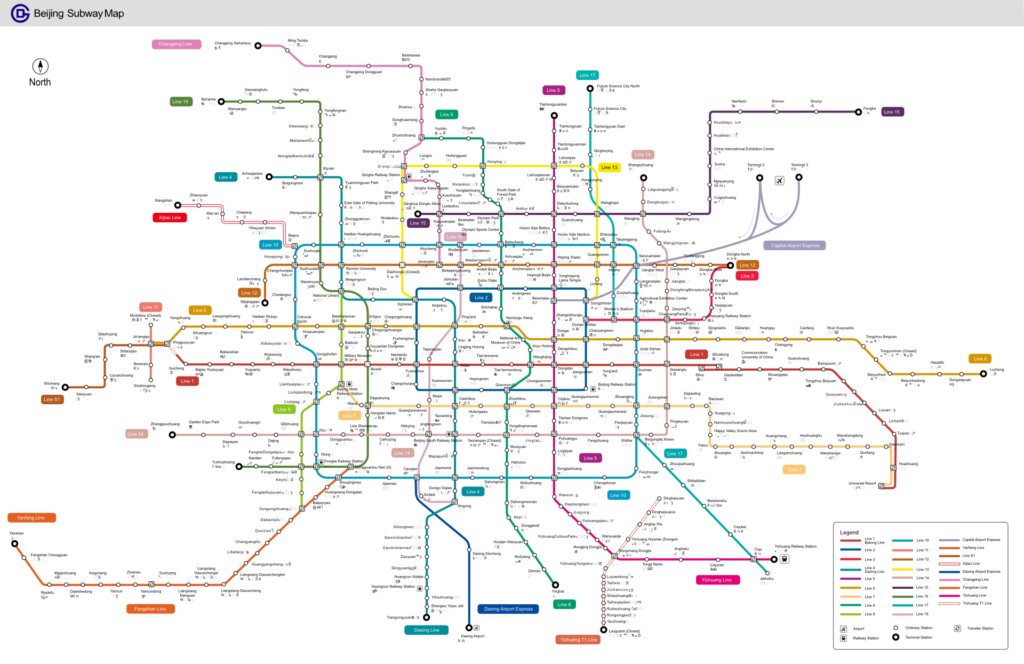
The Beijing Subway is clean, incredibly safe, efficient, and very inexpensive (usually a few cents of Euros per ride).
- Prepare your Alipay application in advance:
Open your Alipay app, tap the “Transport” (or 出行) icon on the homepage, select “Beijing” (same for other cities), and activate the digital metro card. This generates a personal Transit QR code. - The Easiest Way to Ride:
Simply scan this code at the turnstile when entering and when exiting the station. The fare is automatically deducted from your linked international card. - Security:
Please note that every metro station entrance requires a quick bag X-ray scan and security check. - Station Pro-Tip:
- Major stations connect multiple lines. Pay close attention to the exit letters (e.g., Exit A, Exit C3) on the signs to ensure you exit closest to your destination.
- Indications: the next station served by the train is indicated on each platform.
- On the train, the screens indicate which side the doors will open on at the next station.
Taxis & Ride-Hailing
You may require in some case a Chinese phone number.
Do not hail taxis on the street or use Global ride-sharing apps. Instead, use DiDi (China’s equivalent of Uber), which is built directly inside the Alipay app as a mini-program. It features full English support, allows you to type destinations in English, and handles automated digital payments seamlessly.
Digital Connectivity & Communication
You need a VPN.
Overcoming the “Great Firewall”
China restricts access to many international services, including Google (Maps, Translate, Gmail), WhatsApp, Instagram, and Facebook; this applies to both hotel Wi-Fi and mobile networks. To continue using your usual apps, you have two main options if your carrier does not already offer a solution:
- Travel eSIM (Highly Recommended):
Purchase and install a roaming data eSIM (such as Saily, Airalo or Holafly) before arriving in China. Because these operate via international roaming networks, they automatically bypass local internet restrictions, allowing you to use WhatsApp and Google seamlessly without a separate VPN. - VPN (Virtual Private Network):
If you plan to use local hotel Wi-Fi on your laptop, you must download and install a reliable VPN before landing in China. VPNs cannot be downloaded once you are inside the country.
Check the following Visitor eSIM service to avoid any frustration upon connectivity:

Essential Apps to Download
- Navigation:
Google Maps is not updated in China. Apple Maps works perfectly in English for iPhone users. For Android users, download Amap (Gaode) or use the MetroMan app for offline subway mapping. - Translation:
Download Google Translate or Microsoft Translator and download the “Chinese Offline” language pack so you can translate signs and menus via your camera offline = even without an internet connection. - Train Bookings:
If you plan to travel to other cities, download the Trip.com app, which is the most foreigner-friendly platform for booking China’s high-speed rail tickets using an international passport.- ISAD tip: At the station, to go through access control, look for the line with an agent who will process you using your passport.
Visa & Entry Quick Reminder
Entry card: required for all global participants crossing the border
Upon arrival in China, you must submit an Entry Card to cross the border.
- Save time: Complete it online in advance and print it out to show the QR code to border control.
- In-person option: You can also fill it out at the airport right after landing.
Travel Partner for Flight Tickets
For better prices and a smooth travel experience, book with Trip.com through our affiliate form: