

Why use Alipay in the first place?
Alipay is the default application to pay for your transportation services in Beijing (and all of China in general).

The application is city-centric (you need to select Beijing), can be installed from your favorite store on any smartphone (Android or iOS), and offers an interface in English + AI translated.
Please follow the steps below to get prepared!
Step 1: How to Get the App
- Open the App Store (iOS) or Google Play Store (Android) on your smartphone.
- Search for Alipay in the search bar.
- Look for the official blue icon featuring the white Chinese character “支”.
- Tap Get or Install to download the app.
➜ IF IT DOESN’T SHOW UP: open mobile.alipay.com and download + install your compatible version
Step 2: How to Set the App Language to English
If the app opens in Chinese by default, follow these steps to switch to English:
- Open Alipay and tap Me (我的) in the bottom-right corner.
- Tap the Settings gear icon (⚙️) in the top-right corner.
- Tap General (通用).
- Tap Language (多语言 / Language).
- Select English and tap Save (保存) in the top-right corner.
Step 3: How to Set Up an Account with a Foreign Phone Number
- Open Alipay and tap Sign Up / Register.
- Tap the default area code (e.g.,
+86) to open the region list. - Select your home country code (e.g.,
+1US/Canada,+44UK,+61Australia). - Enter your foreign mobile phone number.
- Tap Next to receive an SMS verification code.
- Enter the 4 to 6-digit SMS code and agree to the Terms of Service.
+-------------------------------------------------------------+
| [Screenshot 3: Mobile Phone Registration Screen]            |
|                                                             |
|  Welcome to Alipay                                          |
|                                                             |
|  Country/Region:  [ +1 (United States)  ▼ ]                 |
|  Phone Number:    [ 555-0199              ]                 |
|                                                             |
|  [ ✓ ] I agree to the Terms & Privacy Policy                |
|  [               Get Verification Code                ]     |
+-------------------------------------------------------------+
Step 4: How to Enter Passport Information (Real-Name Verification)
- Tap Me in the bottom-right corner, then tap Settings (⚙️).
- Select Account & Security > Identity Information (or tap Verify Now).
- Choose Passport as your document type and select your home country/region.
- Enter your details exactly as shown on your passport:
- Full Name: Enter given name(s) and surname matching the passport page format.
- Passport Number
- Date of Birth & Passport Expiry Date
- Take a clear photo of your passport’s main photo page when prompted.
- Complete the live facial scan (ensure good lighting and remove glasses or hats).
+-------------------------------------------------------------+
| [Screenshot 4: Passport Verification Form]                  |
|                                                             |
|  Identity Verification                                      |
|  Document Type: [ Passport                        ▼ ]       |
|  Full Name:     [ SMITH JANE MARY                   ]       |
|  Passport No:   [ A12345678                         ]       |
|  Expiry Date:   [ YYYY-MM-DD                        ]       |
|                                                             |
|  [ Upload Passport Photo ]   [ Start Facial Recognition ]   |
+-------------------------------------------------------------+
Step 5: How to Link an International Bank Card
- Tap Me > Bank Cards (or Wallet > Cards).
- Tap + Add Card / Add Bank Card.
- Enter your 16-digit credit or debit card number (Visa, Mastercard, JCB, Discover, or Diners Club supported).
- Input the Expiration Date (MM/YY) and 3-digit CVV code.
- Create a 6-digit Alipay Payment Password (you will enter this PIN code to authorize transactions).
- Complete 3D Secure verification via SMS or your mobile banking app if requested by your issuing bank.
+-------------------------------------------------------------+
| [Screenshot 5: Add International Card Screen]               |
|                                                             |
|  Add Bank Card                                              |
|  Card Number:   [ 4532 •••• •••• 8901           ]           |
|  Expires:       [ MM / YY ]   CVV: [ ••• ]                  |
|  Cardholder:    [ JANE MARY SMITH               ]           |
|                                                             |
|  Supported: Visa, Mastercard, JCB, Discover, Diners         |
|  [                       Submit                       ]     |
+-------------------------------------------------------------+
Step 6: How to Check That Payment Limits Are Removed
Unverified accounts face strict payment caps or declined transactions. To verify your account status and unlocked limits:
- Tap Me > Settings (⚙️) > Account & Security > Identity Information.
- Check the status badge at the top:
- It should show “Verified” or “Authenticated” in green/blue text.
- Verified accounts allow single transactions up to ¥15,000 (~$2,000 USD) and standard annual limits.
- Note: Transactions under 200 CNY incur 0% platform fee; payments above 200 CNY carry a standard 3% processor fee.
+-------------------------------------------------------------+
| [Screenshot 6: Verified Identity Status Page]               |
|                                                             |
|  Identity Information                                       |
|  Status: [ ✓ Verified / Authenticated ]                     |
|                                                             |
|  Name: S***H J*** M***                                      |
|  Passport: A123****78                                       |
|  Account Limits: Standard Foreign Traveler Tier (Active)    |
+-------------------------------------------------------------+
Step 7: How to Switch to Beijing & Install Public Transport Cards
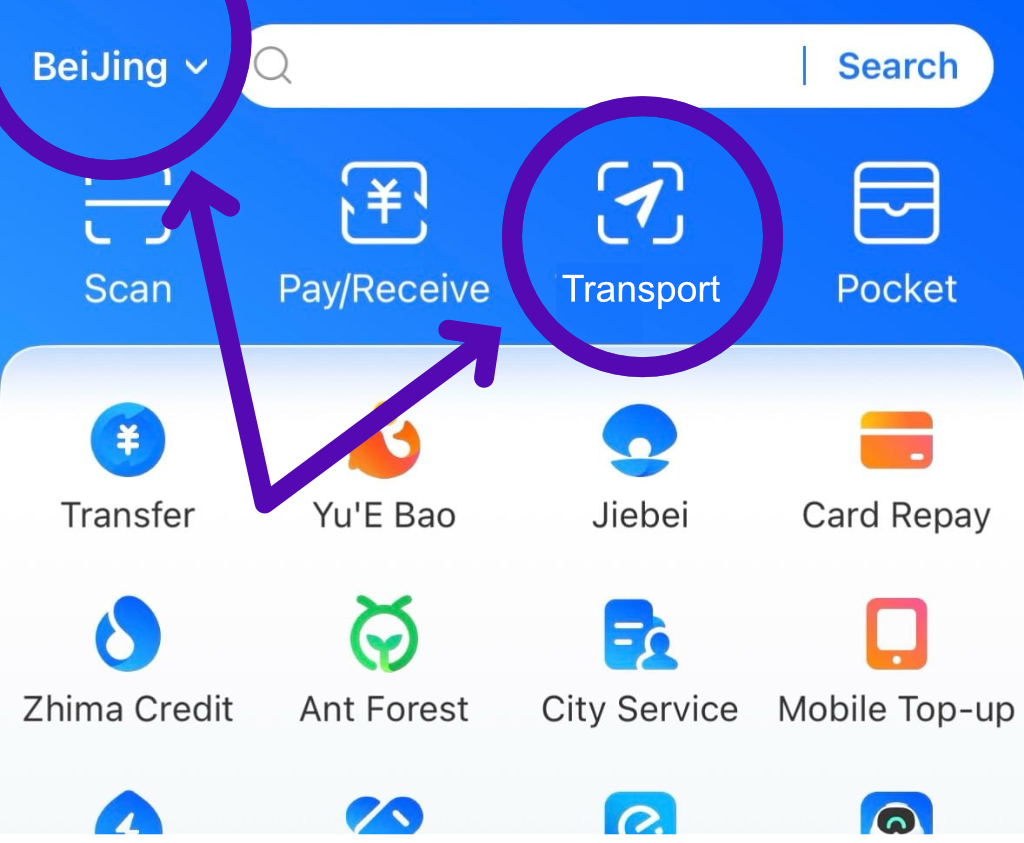
- On the Alipay home screen, check the top-left corner. Tap the city name and select Beijing.
- Tap the Transport icon (🚌/🚆) on the main function grid.
- Select the Metro or Bus tab at the top.
- Tap Agree and Obtain Card / Activate Now for the Beijing Public Transport QR Code.
- Confirm your linked card as the deduction method and enter your 6-digit payment password to authorize auto-pay.
+-------------------------------------------------------------+
| [Screenshot 7: Beijing Transport Pass Activation]           |
|                                                             |
|  Location: [ Beijing ▼ ]                                    |
|  Transport  >  [ Metro ]  /  [ Bus ]                        |
|                                                             |
|  Beijing Subway QR Pass                                     |
|  Pay Method: Visa / Mastercard (••8901)                     |
|  [             Agree & Open Transport Pass            ]     |
+-------------------------------------------------------------+
Step 8: How to Use the Metro Card at Gate Barriers
After the security scan check of your bags:
- Before Approaching Turnstiles:
Open Alipay > Tap Transport (or tap Pay/Collect and select Transport) to generate your dynamic Beijing Metro QR Code. Increase phone screen brightness. - Entering the Station (Tap-In):
Hold your phone screen face-down over the optical scanner window on the turnstile gate barrier. Wait for the green light and beep, then walk through. - Exiting the Station (Tap-Out):
At your destination station, pull up the same QR code and scan it at the exit gate barrier. - Automatic Billing:
The ride fare is calculated automatically based on distance and debited directly from your linked foreign bank card.
+-------------------------------------------------------------+
| [Screenshot 8: Beijing Metro Gate Reader Scanning]          |
|                                                             |
|  +-----------------------+                                  |
|  |   [ Beijing Metro QR ]|                                  |
|  |     |█║▌║█║██║▌█||    |   --->  Scan on Turnstile        |
|  |     Auto-Pay Active   |         Glass Scanner            |
|  +-----------------------+                                  |
|                                                             |
|  [Tap In at Entrance Gate]  ->  [Tap Out at Exit Gate]      |
+-------------------------------------------------------------+